
 astria
529a590cce
astria
529a590cce
|
3 months ago | |
|---|---|---|
| .idea | 5 months ago | |
| backend | 3 months ago | |
| frontend | 3 months ago | |
| nginx | 4 months ago | |
| .gitignore | 5 months ago | |
| Makefile | 5 months ago | |
| README.md | 5 months ago | |
| checklist.md | 4 months ago | |
| create_db.sql | 4 months ago | |
| db.sql | 4 months ago | |
| default.conf | 4 months ago | |
| deploy.sh | 4 months ago | |
| developpement.yaml | 5 months ago | |
| docker-compose.yaml | 3 months ago | |
| documentation.md | 4 months ago | |
| freetube.sh | 4 months ago | |
| sujet.txt | 5 months ago | |
README.md
FreeTube - Video Sharing Platform
📋 Table of Contents
- Overview
- Features
- Tech Stack
- Prerequisites
- Installation
- Configuration
- Usage
- API Documentation
- Project Structure
- Development
- Testing
- Troubleshooting
- Contributing
🎯 Overview
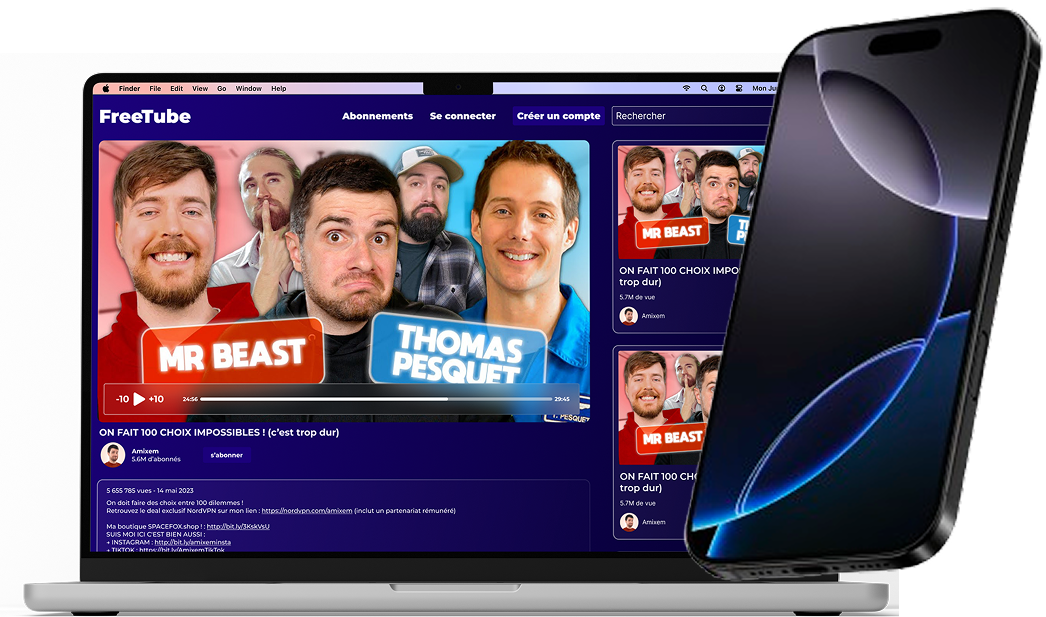
FreeTube is a modern video sharing platform built as a YouTube competitor. It allows users to upload, watch, and interact with videos through comments and likes. The platform features user authentication, video management, channel subscriptions, and a recommendation system.
This project is part of a 3-part development resit assignment focusing on:
- Part 1: HTTP server serving HTML pages
- Part 2: REST API for video, user, and comment management
- Part 3: Interactive frontend user interface
✨ Features
🔐 Authentication System
- User registration with profile picture upload
- Secure login with JWT tokens
- Persistent sessions with localStorage
- Protected routes and authentication guards
- Profile management and display
📹 Video Management
- Video upload with thumbnail generation
- Video streaming and playback
- Video metadata management
- Video search and filtering
👥 User Features
- User profiles with customizable avatars
- Channel creation and management
- Subscription system
- User activity tracking
💬 Social Features
- Video commenting system
- Like/dislike functionality
- Video recommendations
- Trending videos section
🎨 Frontend Features
- Responsive React-based UI
- Modern design with Tailwind CSS
- Client-side routing with React Router
- Real-time updates and interactions
🛠 Tech Stack
Backend
- Runtime: Node.js
- Framework: Express.js
- Database: PostgreSQL
- Authentication: JWT (JSON Web Tokens)
- File Upload: Multer
- Testing: Vitest
Frontend
- Framework: React 18
- Build Tool: Vite
- Styling: Tailwind CSS
- Routing: React Router
- State Management: React Context API
- Fonts: Montserrat, Inter
Infrastructure
- Containerization: Docker & Docker Compose
- Reverse Proxy: Nginx
- Development: Hot reload for both frontend and backend
📋 Prerequisites
Before you begin, ensure you have the following installed:
- Docker (v20.10+)
- Docker Compose (v2.0+)
- Git
🚀 Installation
Quick Start with Docker (Recommended)
-
Clone the repository
git clone <repository-url> cd 3RESIT_DOCKER -
Set up environment variables Create a
.envfile in the root directory:# Database Configuration POSTGRES_USER=freetube_user POSTGRES_PASSWORD=your_secure_password POSTGRES_DB=freetube_db POSTGRES_HOST=db # Backend Configuration BACKEND_PORT=8000 JWT_SECRET=your_jwt_secret_key_min_32_chars LOG_FILE=/var/log/freetube/access.log -
Build and start the application
docker-compose up --build -
Access the application
- Frontend: http://localhost
- Backend API: http://localhost:8000
- Database: localhost:5432
Manual Installation
Click to expand manual installation steps
Backend Setup
cd backend
npm install
npm run dev
Frontend Setup
cd frontend
npm install
npm run dev
Database Setup
- Install PostgreSQL
- Create database and user
- Run migrations (if available)
⚙️ Configuration
Environment Variables
| Variable | Description | Default | Required |
|---|---|---|---|
POSTGRES_USER |
Database username | - | ✅ |
POSTGRES_PASSWORD |
Database password | - | ✅ |
POSTGRES_DB |
Database name | - | ✅ |
POSTGRES_HOST |
Database host | db | ✅ |
BACKEND_PORT |
Backend server port | 8000 | ✅ |
JWT_SECRET |
JWT signing secret | - | ✅ |
LOG_FILE |
Log file path | /var/log/freetube/access.log | ❌ |
Docker Volumes
The application uses the following volumes:
./backend/logs:/var/log/freetube- Application logs./backend/app/uploads:/app/app/uploads- Uploaded files (videos, images)- Database data volume for PostgreSQL persistence
📖 Usage
Getting Started
-
Create an Account
- Navigate to http://localhost
- Click "Créer un compte"
- Fill in your details and optionally upload a profile picture
- Submit the form to register and automatically log in
-
Login
- Click "Se connecter" on the homepage
- Enter your username and password
- You'll be redirected to the authenticated homepage
-
Upload Videos
- Use the API endpoints to upload videos (see API documentation)
- Videos are stored in the uploads directory
-
Browse Content
- View recommendations on the homepage
- Search for videos using the search bar
- Browse trending videos and top creators
Authentication Flow
The authentication system works as follows:
- User registers/logs in through the frontend forms
- Backend validates credentials and returns JWT token
- Token is stored in localStorage for persistence
- Protected routes check authentication status
- Navbar updates to show user profile and logout option
📚 API Documentation
Authentication Endpoints
Register User
POST /api/users/
Content-Type: multipart/form-data

email: user@example.com
username: johndoe
password: securepassword
picture: [file upload]
Login User
POST /api/users/login
Content-Type: application/json

{
  "username": "johndoe",
  "password": "securepassword"
}
Media Endpoints
Get Profile Picture
GET /api/media/profile/{filename}
Get Video Thumbnail
GET /api/media/thumbnail/{filename}
Additional Endpoints
- Videos:
/api/videos/ - Comments:
/api/comments/ - Channels:
/api/channels/ - Playlists:
/api/playlists/ - Recommendations:
/api/recommendations/
For detailed API documentation, check the .http files in the backend/requests/ directory.
📁 Project Structure
3RESIT_DOCKER/
├── backend/                    # Node.js Express backend
│   ├── app/
│   │   ├── controllers/        # Request handlers
│   │   ├── middlewares/        # Express middlewares
│   │   ├── routes/            # API route definitions
│   │   ├── uploads/           # File storage
│   │   └── utils/             # Utility functions
│   ├── logs/                  # Application logs
│   ├── requests/              # HTTP request examples
│   └── test/                  # Test files
├── frontend/                  # React frontend
│   ├── src/
│   │   ├── components/        # Reusable React components
│   │   ├── contexts/          # React Context providers
│   │   ├── pages/             # Page components
│   │   ├── routes/            # Route configuration
│   │   └── assets/            # Static assets
│   └── public/                # Public assets
├── nginx/                     # Nginx configuration
└── docker-compose.yaml       # Docker orchestration
🔧 Development
Available Scripts
Backend
npm run dev          # Start development server with hot reload
npm run start        # Start production server
npm run test         # Run tests
Frontend
npm run dev          # Start development server
npm run build        # Build for production
npm run preview      # Preview production build
npm run lint         # Run ESLint
Docker Commands
# Start all services
docker-compose up --build

# Stop all services
docker-compose down

# View logs
docker-compose logs [service-name]

# Restart specific service
docker-compose restart [service-name]

# Reset database
docker-compose down --volumes
Development Workflow
- Backend Changes: Automatically reload with nodemon
- Frontend Changes: Hot module replacement with Vite
- Database Changes: Restart containers to apply schema changes
- Nginx Changes: Restart nginx service
File Upload Testing
Use the provided .http files in backend/requests/ to test API endpoints:
user.http- User registration and authenticationvideo.http- Video managementmedias.http- Media file servingcomment.http- Comment system
🧪 Testing
Running Tests
# Backend tests
cd backend
npm test

# Frontend tests (if configured)
cd frontend
npm test
Test Structure
- Unit Tests: Individual component/function testing
- Integration Tests: API endpoint testing
- E2E Tests: Full application workflow testing
Current test coverage includes:
- User authentication
- Video management
- Comment system
- Channel operations
- Playlist functionality
🔍 Troubleshooting
Common Issues
Authentication Problems
- Blank screen on reload: Check browser console for context errors
- Login not persisting: Verify JWT token in localStorage
- Registration fails: Check file upload size limits
Media File Issues
- 404 on images: Verify nginx proxy configuration
- Upload fails: Check file permissions and upload directory
Docker Issues
- Containers won't start: Check port conflicts
- Database connection fails: Verify environment variables
- Build failures: Clear Docker cache with
docker system prune
Debug Commands
# Check container status
docker-compose ps

# View service logs
docker-compose logs -f [service-name]

# Access container shell
docker-compose exec [service-name] /bin/bash

# Reset everything
docker-compose down --volumes --rmi all
docker system prune -a
Performance Optimization
- Enable nginx caching for static assets
- Implement image optimization for uploads
- Use CDN for media file delivery
- Database query optimization
- Frontend code splitting
🤝 Contributing
- Fork the repository
- Create a feature branch (
git checkout -b feature/amazing-feature) - Commit your changes (
git commit -m 'Add amazing feature') - Push to the branch (
git push origin feature/amazing-feature) - Open a Pull Request
Code Style
- Backend: ESLint with Node.js rules
- Frontend: ESLint with React rules
- Formatting: Prettier for consistent code style
- Commits: Conventional commit messages
📜 License
This project is part of an educational assignment. All rights reserved.
👥 Authors
- Developer: [Your Name]
- Institution: [Institution Name]
- Course: 3 RESIT - Web Development
📞 Support
For support and questions:
- Create an issue in the repository
- Check the troubleshooting section
- Review the API documentation
Happy coding! 🚀